
Matlab
Contents
Matlab#
Author: Fu Yin
Update: Dec 18, 2022
Reading: 30 min
Install Matlab in NOTS#
Download matlab in Rice webpage,
and then install in NOTS.
I don’t have the sudo permission, so I need to change the authority of install script.
Take my pkg for example, matlab_R2022b_glnxa64 is the installation pkg, and MATLAB_R2022b is the folder after installing.
# install matlab without sudo mode
cd /PathToMatlab/matlab_R2022b_glnxa64/bin/
chmod -R 777 install
./install

# actiavte the license
cd /PathToMatlab/MATLAB_R2022b/bin
./activate_matlab.sh
Run Matlab in VSCode#
Install the extensions:
Matlab: code highlighting, code completion (this function does not work well, some codes cannot be automatically completed), real-time grammar checking,matlab-formatter: code formatting,Matlab Snippets: code completion (supplement to the plug-in Matlab code completion function),Matlab Code Run: run the m file and Matlab command line in the terminal of Vscode.
Set the env variable in settings.json as following:
$ open settings.json

# insert
"matlab.mlintpath": "/Applications/MATLAB_R2022b.app/bin/maci64/mlint",
"matlab.matlabpath": "/Applications/MATLAB_R2022b.app/bin/matlab",
"files.associations": {
        "*.m": "matlab"
    }
Or set the varibale in setting:
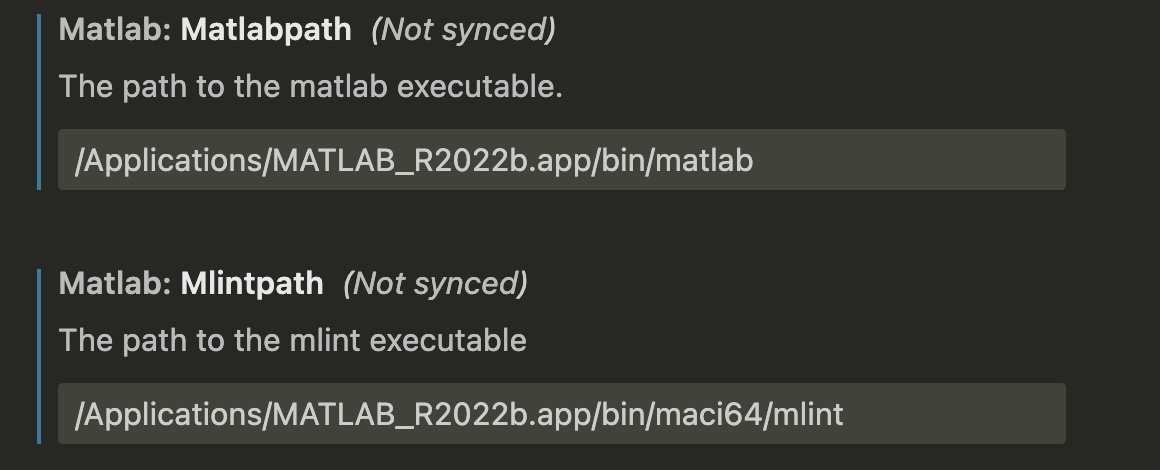
Fig. 7 settings.json#
Run scripts in vscode:
Type
shift+command+Pto open command panel.Type
>matlabto chooseRun Matlab File, which will open anTERMINALin VSCode terminal.Matlab script will also be run in this terminal.
Run Matlab Script in Terminal#
Add the matlab path into env PATH. Take running script.m in terminal for example:
# add file path in matlab script
addpath(folder_path)

# start matlab without open GUI
matlab -nodesktop -nosplash

# run script.m in terminal
matlab -nodesktop -nosplash -r script.m